SSH into a network that only lets HTTPS out
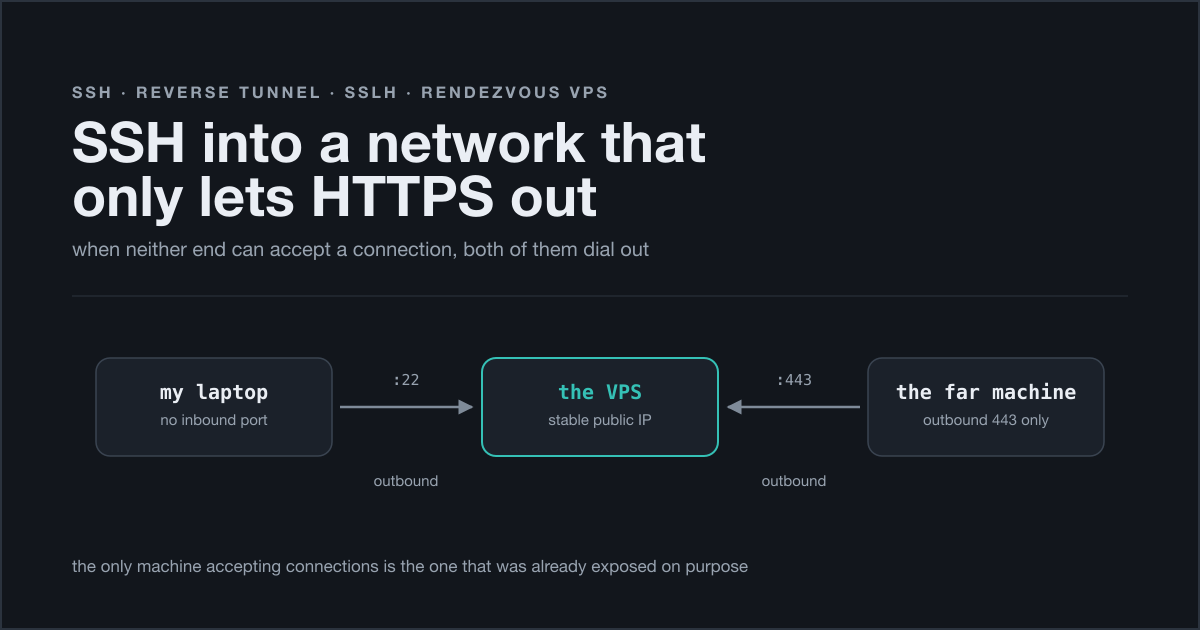
I wanted an SSH session on a machine that sits behind a network which only lets HTTPS out. Not a fancy requirement: a terminal, on a box I am allowed to use, from my own laptop, without a chain of intermediate windows in between. It took me an evening, and most of that evening was spent discovering that the obvious solution is not merely awkward — it is arithmetically impossible.
The interesting part is not the tunnel. Everybody has drawn an ssh -R on a whiteboard at some point. The interesting part is why the direct version cannot work, and what you have to do when the machine you use as a meeting point is already busy doing something else on the only port you are allowed to use.
Two constraints that never met
Here is the setup, stripped of everything that doesn’t matter.
On my side, home: an ordinary consumer connection, and a router that will happily do port forwarding — but only inside a band of high ports, 8192 to 16383. Ask it to map anything outside that band and the form simply declines.
My first guess was CGNAT, and my first guess was wrong. I compared the address the router shows on its own status page with what curl ifconfig.me came back with, and they matched: the public address really was on my router, not on a carrier box three hops upstream. What my ISP actually does is subtler. It shares a single public IPv4 address between four subscribers and divides the port space between them — 65536 ports, 16384 each — using MAP-E/MAP-T rather than classic carrier-grade NAT. I was assigned the second quarter. Somebody I will never meet, on the same public address, has the first.
That distinction matters more than it sounds. Under plain CGNAT you cannot open an inbound port at all, and no amount of clicking around the router UI changes that. Here I have complete control inside my slice: port forwarding works normally, no tricks, nothing to request from the ISP. The space is simply smaller than the whole. What it costs is the use of well-known port numbers — 443 for a site, 32400 for Plex, anything with a canonical number attached to it — because none of them fall inside my quarter. Most of the time you absorb that with one layer of indirection, external 9000 pointing at internal 80, as long as whatever is connecting can be told which port to use. Some things cannot: a few games insist on one specific fixed port (3074, for Xbox Live and Call of Duty, is the one everybody runs into) and will report a moderate or strict NAT forever, on a connection where everything else is perfectly healthy.
So the constraint at my end is not “no inbound ports at all”. It is a hard, non-negotiable interval: 8192 to 16383.
On the other side: a network that permits outbound traffic on standard low ports only. Port 443 goes out. Port 80 goes out. Anything else does not come back with a refusal — it just sits there until it times out, which is the least helpful failure mode there is, because for the first thirty seconds it looks exactly like a routing problem.
Now put both constraints on the same axis.
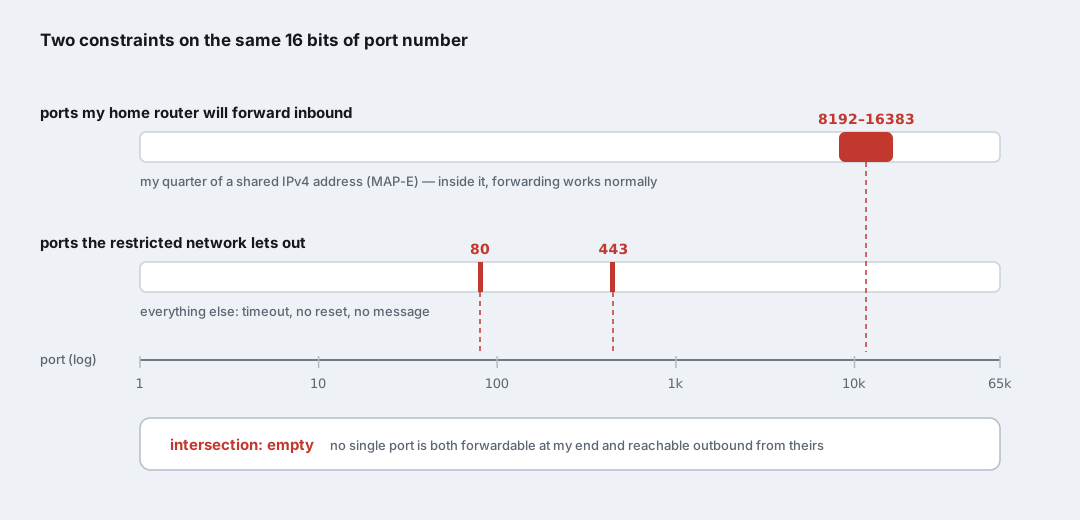
The plan I started with was the naive one: run a reverse tunnel from the far machine straight to my home router, forward a port, done. That plan requires one port that is both forwardable at my end and permitted outbound at theirs. There isn’t one. 8192–16383 and {80, 443} do not overlap, and no amount of retrying makes them.
That is a genuinely useful moment in debugging. Not “this doesn’t work yet”, but “this cannot work, stop looking for the typo”. I spent a while with Test-NetConnection staring at timeouts before I worked that out, which is a whole half hour I would like back.
The fix is a third machine
If neither end can accept a connection, then neither end should try to. Put a third node in the middle — one that can accept connections, because it is already on the public internet on purpose — and let both real endpoints dial out to it.
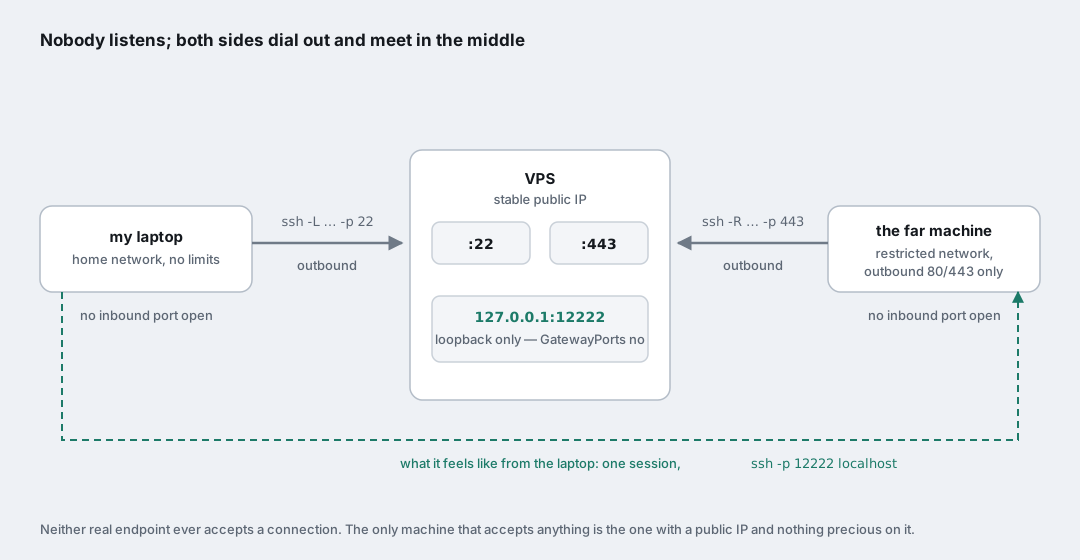
I already had the perfect candidate: a small, cheap VPS with a stable public IP that hosts a couple of my own sites. That box becomes a rendezvous point. Both sides open outbound connections to it, which is the one thing both networks agree to allow, and their two tunnels are stitched together in the middle.
The far machine opens the reverse leg, on the port its network permits:
1
ssh -N -R 12222:<target>:22 user@vps -p 443
That says: “take port 12222 on the VPS, and anything that connects to it, pipe it back through this session to <target>:22.” Note that <target> does not have to be the machine typing the command — it is resolved from that machine’s point of view, so it can be anything it can route to. Handy.
From my laptop, the forward leg, on the ordinary port, because my own network doesn’t care:
1
ssh -N -L 12222:localhost:12222 user@vps -p 22
And then, in another terminal, the whole thing collapses into something almost boring:
1
ssh -p 12222 user@localhost
Two hops, two -N sessions doing nothing but holding pipes open, and a login that behaves as if the machine were on my desk.
One detail worth spelling out, because it is doing real security work quietly: the forwarded port on the VPS is bound to 127.0.0.1, not to the public interface. That is GatewayPorts no, the OpenSSH default, and it means nobody on the internet can reach port 12222 by scanning the VPS. To get to it you first need a valid SSH key on the VPS to open the second hop. The default is the right one here; resist the urge to “fix” it.
The reverse leg is also only alive as long as its ssh process is. Native ssh.exe won’t reconnect on its own, so if you want it to survive a dropped link it goes in a loop with ServerAliveInterval set, started by whatever scheduler that machine has.
The port was already taken
This is where it stopped being a textbook exercise.
The VPS listens on 443 already. That port belongs to a containerised Caddy doing TLS termination for real sites that real people load. I could not simply point sshd at it. And the far network only lets 443 out, so I could not pick a different one either.
The answer is an application-level multiplexer. sslh sits on the public port, reads the first few bytes of each incoming TCP connection, recognises what protocol the client is speaking, and hands the socket to the appropriate local backend.
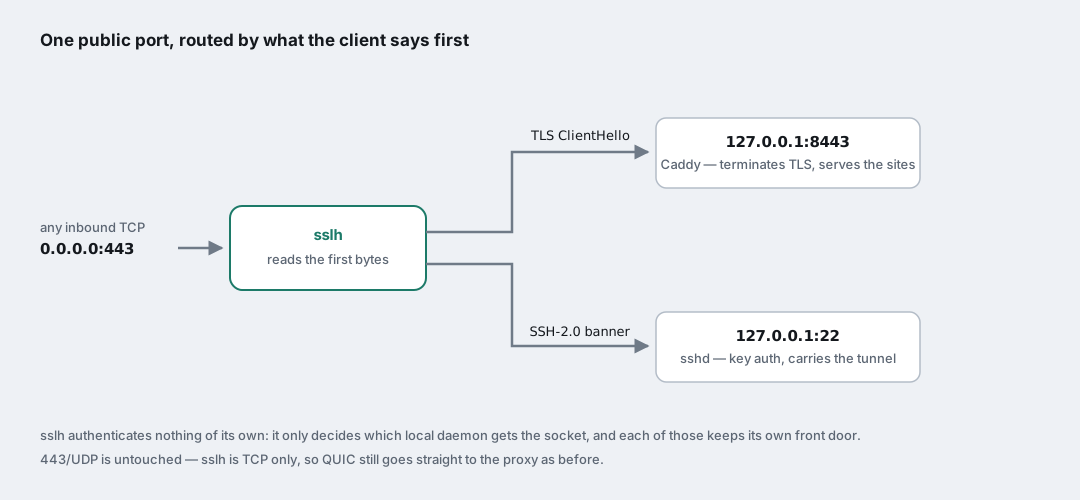
It works because the two protocols announce themselves differently and immediately. An SSH client opens with a version banner in clear text; a TLS client opens with a ClientHello. You can tell them apart long before either has said anything meaningful.
The configuration is one line:
1
DAEMON_OPTS="--user sslh --listen 0.0.0.0:443 --listen [::]:443 --ssh 127.0.0.1:22 --ssl 127.0.0.1:8443"
Which meant Caddy had to move off the public port. In the compose file, one string:
1
- "127.0.0.1:8443:443"   # was: "443:443"
The container still terminates TLS exactly as before, with the same certificates and the same config — it is simply no longer reachable from outside except through the multiplexer. Worth noting that 443/udp stays published as it always was: sslh is TCP only, so HTTP/3 over QUIC keeps going straight to the proxy and there is no conflict to resolve.
Binding a privileged port without staying root
The sslh unit shipped by the distribution has a small piece of systemd craftsmanship in it that I enjoyed more than I expected:
1
2
3
DynamicUser=true
AmbientCapabilities=CAP_NET_BIND_SERVICE
SecureBits=noroot-locked
Binding port 443 needs privilege. Serving traffic all day does not. So the service starts with just enough capability to claim the port, then drops to an unprivileged system user — and SecureBits=noroot-locked is what keeps the ambient capability alive across that UID change, which by default would strip it. Least privilege, expressed in three lines, with no wrapper script and no setuid binary. I have written much worse solutions to that exact problem.
Things I did not order
Two small surprises, both worth mentioning because they are the kind of thing that bites you three months later at a reboot.
Installing sslh pulled in Apache. The Debian package recommends a generic “httpd” provider, apt satisfied that with apache2, and apt has no way of knowing that the actual web server on this box is a container. Left alone, it would have tried to bind port 80 on every boot, failed, and sat there in a permanently failed state — noise that would eventually be mistaken for a real problem. Removed immediately.
And while I was in there I found a stray Port 80 line in sshd_config, left over from an earlier attempt of mine that went nowhere. It was doing nothing at the time. It would have been doing something quite annoying at the next restart, when it collided with whatever else wanted that port. Deleted.
Neither of these was hard. Both were invisible until I went looking.
The four wrong answers I got first
The path to the working setup was not a straight line. In order:
Test-NetConnection timing out towards my home address. Not a firewall, not the ISP: the port I was probing was outside the range the router is willing to forward at all. Constraint, not fault.
nc -zv <ip> 22 on my own LAN hanging with no output. Two separate things stacked here, which is why it was confusing. The port genuinely was closed — Remote Login was not actually enabled, and lsof -iTCP -sTCP:LISTEN showed nothing on 22. But the tool itself also appeared frozen, and that was a reverse DNS lookup on every address it printed. Add -n -P and it answers instantly. A diagnostic that takes twenty seconds to tell you nothing is worse than no diagnostic at all.
Connection closed by <ip> port 443 from the far side. Not a rejection, not a filter: my own VPS closing the door. The port was still held by docker-proxy, because at that point Caddy was still published on it. sudo ss -tlnp | grep :443 names the owner in one line, and it is the first thing I should have run.
curl -k https://127.0.0.1:8443 returning a TLS internal error. I spent a few minutes convinced I had broken the certificates. I had not. Passing -k skips verification, it does not change what the client sends, and a request to a bare IP carries no SNI. Caddy, correctly, had no idea which site I was asking for. The right test keeps the hostname and only redirects where it connects:
1
curl --resolve site.example:8443:127.0.0.1 https://site.example:8443/
Three of these four were the tooling misleading me rather than the system being broken. That ratio feels about right for a networking evening.
Is this safe? Mostly. That is not the interesting question.
The honest technical answer is: yes, within its own terms.
No new port is exposed to the internet — 443 was already open for the websites. Both hops authenticate with keys, no passwords anywhere. The forwarded port never leaves loopback on the VPS, so it cannot be found by scanning. And sslh adds no authentication surface of its own: it decides which local daemon gets the socket and nothing else, with sshd and Caddy each keeping their own front door exactly as before.
The less comfortable question is the one that has nothing to do with cryptography. This pattern creates a direct path between the open internet and a network that was previously reachable only by going through an intermediate checkpoint. Every technical control above is intact; the procedural one — somebody, somewhere, being able to see who reaches that network and when — is the thing the tunnel routes around.
If the network on the far end is isolated because of a deliberate policy rather than an accident of topology, that is a conversation to have with whoever owns the policy, before the tunnel becomes load-bearing. “It authenticates with keys” is a good answer to a different question. Being able to build something is not the same as being the person who gets to decide it should exist, and I would rather write that down than pretend the thought never came up.
What I would tell myself at the start of the evening
- Write both sets of constraints down as ranges before you try anything. If they don’t intersect, no configuration will save you, and you will have saved yourself an hour of pinging.
- When neither end can listen, stop trying to make one of them listen. Add a node that already does, and let both sides dial out to it.
GatewayPorts nois the default for a reason. A forwarded port on loopback is reachable only by someone who can already authenticate to that host.- Before assuming a remote port is filtered, check who owns it locally.
ss -tlnpis faster than any theory. -non your network tools. Reverse DNS turns a fast answer into a hang that looks like a bug in someone else’s system.curl -kskips verification, not SNI. Use--resolvewhen you want to test a specific backend by hostname.- After installing anything, read what came with it. A recommended dependency that fails quietly at every boot is technical debt you did not choose.
The whole thing is maybe six lines of configuration once you know which six. Everything before that was geometry.