What if I have to build this VM again?
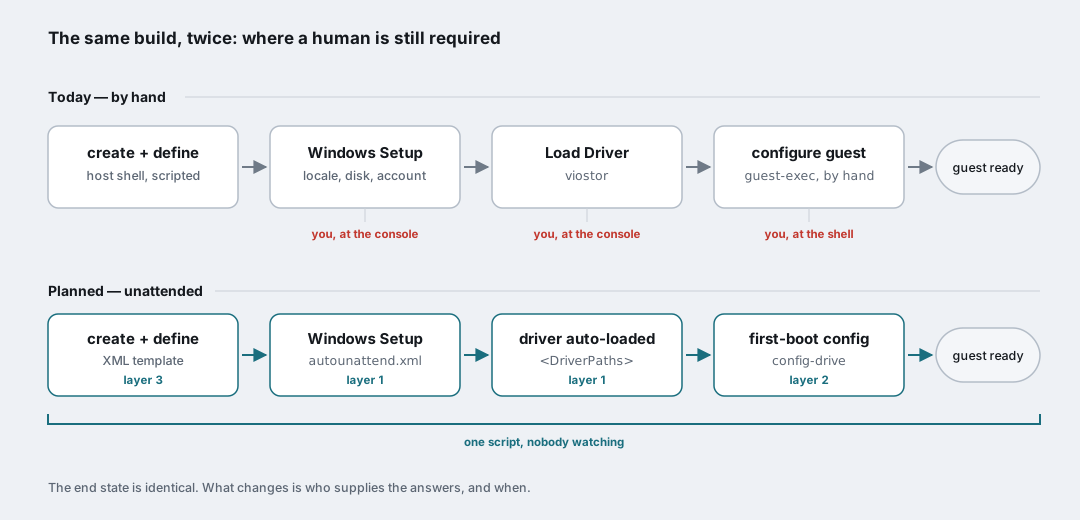
I rebuilt a Windows 11 guest by hand this week. Same Beckhoff industrial PC running TwinCAT Linux RT I wrote about last time — Debian, real-time kernel, KVM and libvirt underneath. I clicked through the whole Windows installer over a SPICE console, stopped halfway to hand it the VirtIO storage driver by hand, and then spent a while firing configuration commands into the running guest through the QEMU guest agent until it had an address, RDP and SSH.
It worked. And the moment it worked, the interesting question arrived: what happens when I have to do this a second time?
Before you read any further, one thing needs saying plainly, because I would be annoyed to find it out in the last paragraph: none of what follows has been built. This is a design, written down at the end of the day it was designed, not a walkthrough of something that runs. No screenshots of it working, no timings, no “and it just worked”. If it does get built, that will be a different post, and the honest version of it will include the parts of this plan that turned out to be wrong.
So: here is why a manual rebuild is not good enough, and the architecture I intend to replace it with.
The manual work never went away, it just moved
It is tempting to look at that rebuild and call it half-automated. The second half of it was, after all, driven from the host shell rather than from a mouse — once the QEMU guest agent was talking, I could set the static address, open the Windows firewall and enable services without ever looking at the console again.
That is a real improvement, and it is not automation. It is the same manual work, relocated. Three distinct kinds of hand-holding are in there:
- The setup wizard. Language, keyboard, edition, disk layout, the account, the seven privacy toggles. Pure clicking, and it cannot be scripted from outside, because nothing inside the VM is listening yet.
- The driver detour. Windows Setup does not ship the VirtIO block driver, so it reaches the disk selection screen, finds no disk, and waits for a human to press Load Driver and point it at the
viostorfolder on a second CD. A hard stop, right in the middle of the installation, that exists purely because two vendors never met. - The post-install configuration. The guest-agent commands. Faster than the console, still a sequence I have to reissue, in order, remembering which ones matter, every single time.
And there is a structural problem with that last one that no amount of shell history fixes. guest-exec is a push, and it needs a target. The VM has to be powered on, the guest agent has to be installed and running, the virtio-serial channel has to exist in the domain XML — all of which are things you configure after the install you are trying to automate. It is a mechanism for talking to a machine that is already alive and already partly configured. It is not a mechanism for bringing one into existence.
What I want instead is a machine that is already correct the first time it reaches a login screen, with nobody watching.
The plan, in three layers
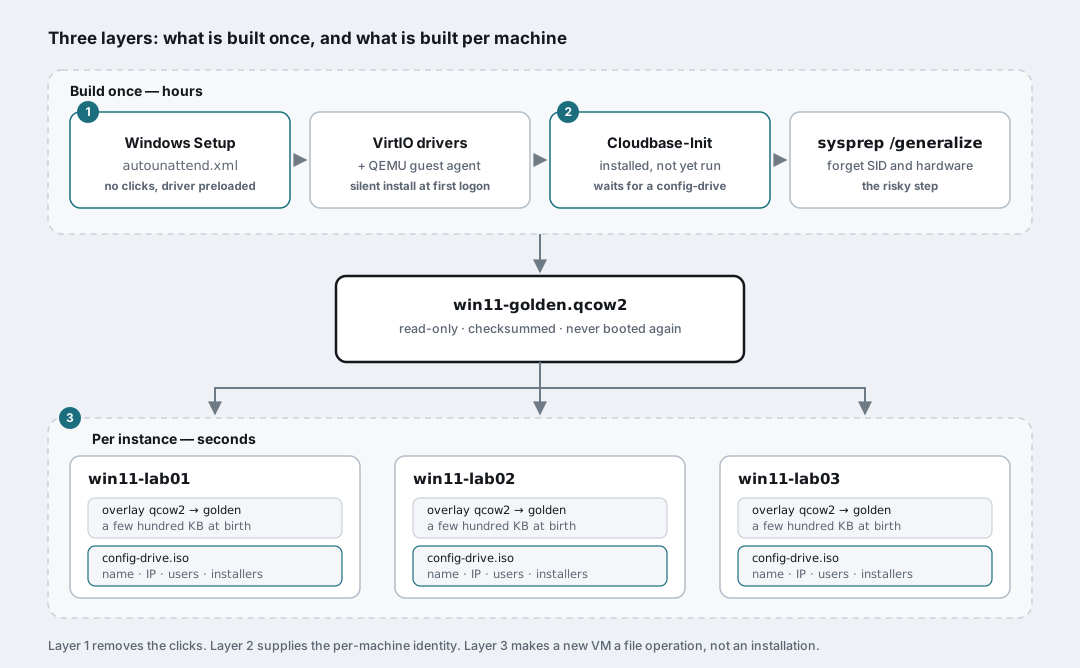
Each layer removes a different category of manual step, and each one is useless on its own.
Layer one: an answer file for Windows Setup
autounattend.xml is Microsoft’s own answer file format. Drop it in the root of a floppy or a small ISO attached to the VM, and Windows Setup finds it and stops asking questions: locale, keyboard, disk partitioning, the local account, the licence terms, all pre-answered.
Standard stuff, and not the part I care about. The part I care about is this one:
1
2
3
4
5
6
7
8
9
<settings pass="windowsPE">
  <component name="Microsoft-Windows-PnpCustomizationsWinPE" ...>
    <DriverPaths>
      <PathAndCredentials wcm:action="add" wcm:keyValue="1">
        <Path>E:\viostor\w11\amd64</Path>
      </PathAndCredentials>
    </DriverPaths>
  </component>
</settings>
(namespaces trimmed for readability)
DriverPaths runs in the windowsPE pass, which is to say before the disk selection screen. Point it at the VirtIO ISO that is already attached to the VM and the installer loads viostor itself, finds the disk, and carries on. The single most annoying interactive step in the whole process disappears because you told the installer where to look.
The same file can also run commands at the end of setup, through FirstLogonCommands or a SetupComplete.cmd script — which is where virtio-win-guest-tools.exe gets installed silently, so the network driver, the balloon driver and the QEMU guest agent are all present before anyone connects.
One thing an answer file cannot do, though: it belongs to the installation. It is baked into the media, it runs once, and it knows nothing about which particular VM it is producing. Reinstalling Windows from scratch for every new instance, just to give it a different IP address, is not a plan. Which is exactly what the second layer is for.
Layer two: Cloudbase-Init, or cloud-init that speaks Windows
On the Linux side this problem was solved a long time ago and everybody stopped thinking about it. You boot a generic cloud image, cloud-init reads a bit of metadata from somewhere, and the machine configures itself. Cloudbase-Init is the same idea ported to Windows — Apache 2.0, maintained, the thing OpenStack deployments have used for Windows guests for years.
Two properties make it the right fit here rather than merely a nice idea.
It works entirely offline. The host I am dealing with has no internet access, by design, and neither does the guest. Anything that phones home is disqualified before it starts. Cloudbase-Init does not have to: the metadata source I plan to use is a config-drive, which is just a small ISO attached to the VM as a second CD-ROM.
It pulls instead of being pushed to. At every boot, Cloudbase-Init looks for a volume labelled config-2 and reads openstack/latest/meta_data.json and openstack/latest/user_data off it. No network, no agent channel, no host reaching in. The guest asks for its own configuration, at a point in the boot where nothing else has happened yet, and applies it before the first login is even possible.
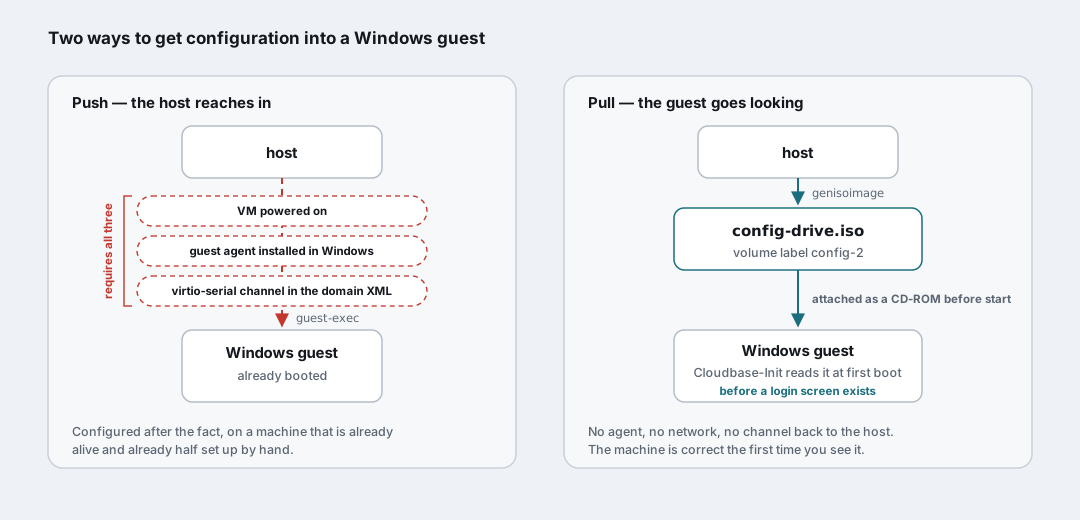
That inversion is the whole point. Building the drive on the host is unremarkable — a directory tree and one command:
1
$ genisoimage -o config-drive.iso -V config-2 -J -r -ldots config/
The interesting part is what goes in user_data: the network configuration, the users, the commands to run offline installers that were shipped along on the same ISO. Everything that today is a list of guest-exec invocations I paste in by hand becomes a text file that lives in a repository, gets reviewed like code, and is regenerated per instance.
Layer three: build once, clone in seconds
The last layer is the cheapest one and the one that turns the first two from a curiosity into something worth the effort.
Build the image exactly once — answer file, VirtIO drivers, guest agent, Cloudbase-Init installed and configured — then run sysprep /generalize so Windows forgets its machine SID, its hardware and its name. Mark the resulting win11-golden.qcow2 read-only and never touch it again.
Every new VM after that is a thin overlay on top of it:
1
2
3
$ qemu-img create -f qcow2 -F qcow2 \
    -b /var/lib/libvirt/images/win11-golden.qcow2 \
    /var/lib/libvirt/images/win11-lab03.qcow2
Seconds, and a file that starts out a few hundred kilobytes, instead of a full Windows installation. Add a per-instance config-drive with that VM’s identity, plus a domain XML template with the name, UUID and MAC addresses parameterised, and creating a machine becomes a script rather than an afternoon.
There is an uncomfortable irony here that I want to name rather than gloss over. My previous post was about a VM that broke because of a qcow2 backing chain whose files had been half deleted by somebody tidying up — a base image and a good overlay gone, leaving a domain quietly booting from an intermediate state nobody wanted. And here I am proposing to build backing chains on purpose.
The difference I am betting on is that these ones are designed. One layer deep, never more. The base is read-only, immutable, and its checksum is recorded. The overlays are disposable by definition — if one gets confused, you delete it and regenerate it from the same config-drive, which is the entire point of the exercise. A chain you can rebuild from a text file is a completely different object from a chain you inherited and have to reverse-engineer. We will see whether I still believe that in six months.
The parts I expect to fight with
Since this is a plan rather than a result, the honest thing is to list what I think will hurt. I would rather be on record now than write a triumphant follow-up that quietly omits the bad afternoon.
sysprep /generalizeon a guest with passthrough hardware. This VM has a GPU and USB devices passed through, an emulated TPM and Secure Boot. Generalising a Windows install that has been intimate with specific PCI devices is exactly the kind of thing that produces a machine which boots once and then does not. The golden image may well need to be built on a deliberately boring virtual hardware profile and only ever cloned onto the interesting one.- The answer file schema is unforgiving. A misspelled component name or a value in the wrong pass does not produce an error message; it produces an installer that ignores the file and sits there waiting for a human, which looks identical to having no answer file at all. Debugging this is a loop of full reinstalls.
- Attaching the config-drive. The SATA bus on this domain does not hot-plug, so the config-drive ISO has to be attached before the VM starts and detached with it powered off. That constrains the provisioning script more than it sounds like it does.
- Cloudbase-Init itself has to get in there offline. Its own installer needs to reach the golden image somehow, which means another ISO — the same trick I already had to use to get an SSH server into an isolated guest, because the official
Add-WindowsCapabilityroute insists on talking to Windows Update and fails when it cannot. - Identity plumbing. MAC addresses are not decoration on this host: a static DHCP reservation and a firewall hook both key off them. Parameterising the domain XML means parameterising those too, consistently, or the automation will produce VMs that boot beautifully and are unreachable.
Is it worth it for one VM?
Strictly, no. For a single machine that gets rebuilt once a year, the three layers above cost more than they save, and anyone selling you automation ROI on those numbers is doing arithmetic with their thumb on the scale.
The reason I want to build it anyway is not the time. It is that today the definitive description of how this VM is configured lives in three places: a knowledge-base document, my shell history, and my memory — and two of those are going to be wrong within a month. Once the build is an answer file plus a config-drive plus a template, the description of the machine is the thing that builds it. It can be diffed. It can be reviewed. It can be handed to somebody else. And the recovery story stops being “restore a backup and hope it is the right layer” and becomes “run the script again”.
That last one is the part I actually care about, and it comes directly from spending a morning doing archaeology on a snapshot chain to work out which file held the good state.
Come back for the sequel, or the obituary
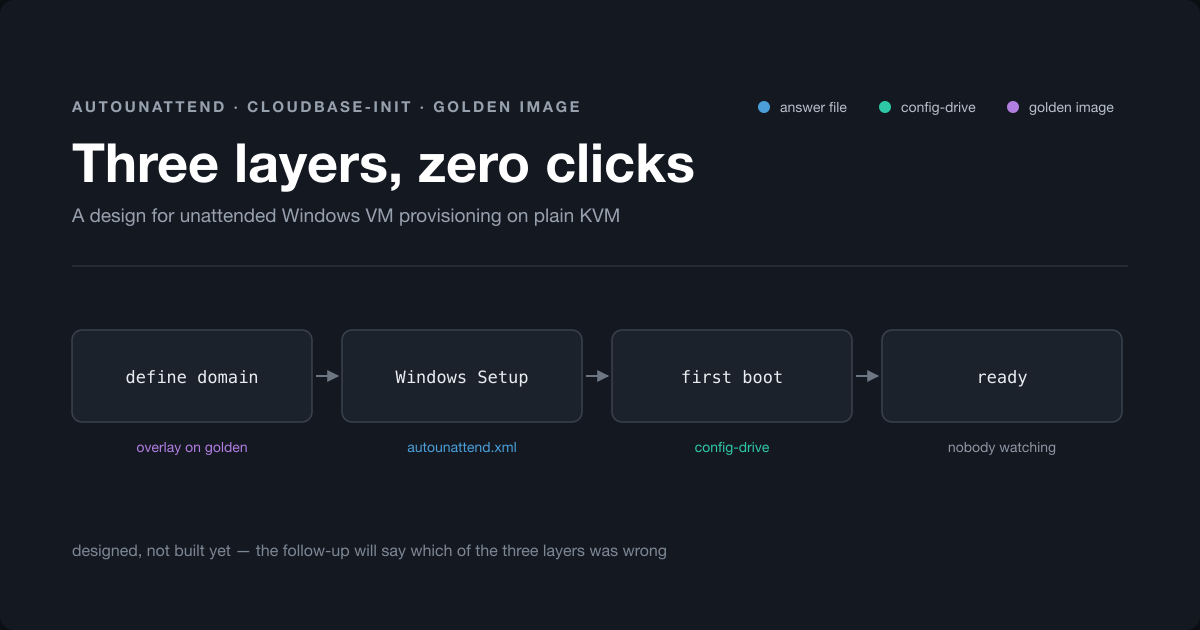
So this is not “I automated my Windows VM provisioning”. It is “here is why it is worth automating, and here is the architecture I intend to use”. Answer file for the install, config-drive for the identity, golden image for the multiplication.
The next post on this will either be the build log, or an explanation of which of the three layers turned out to be a bad idea. If it never appears at all, you can safely assume sysprep won.