No console, no RDP
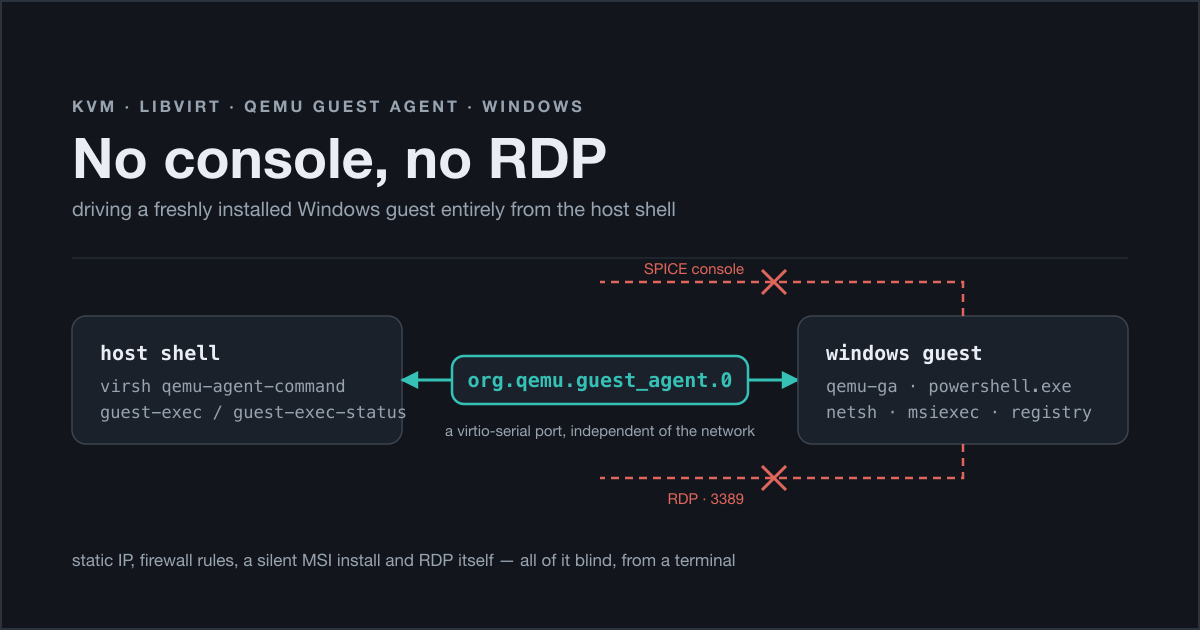
I rebuilt a Windows 11 VM this week. It lives on a Beckhoff industrial PC running TwinCAT Linux RT — Debian underneath, real-time kernel, automation runtime on top — with KVM and libvirt doing the virtualisation, and I reach that box through a rather long chain of SSH hops. Long enough that a graphical console is a genuine nuisance: I have to stand up a port forward for SPICE, open a client, wait for the picture, and then do things with a mouse that I will have no record of afterwards.
Installing Windows itself needs the GUI, there is no way around that with a plain ISO. But once the installer is done, does anything else really need it? That was the question I started with, and the answer turned out to be: almost nothing. Static IP, firewall rules, a silent MSI install, enabling RDP — all of it done blind, from a terminal on the host, through the QEMU guest agent.
This is the write-up I wanted to find when I started. What the mechanism actually is, the copy-pasteable recipe, and the two things that wasted my afternoon.
The agent is two halves, and only one of them is inside Windows
The QEMU guest agent gets described as “a thing you install in the guest”, which is half true and exactly the half that misleads you.
Inside Windows you install virtio-win-guest-tools.exe from the virtio driver CD, which brings the NIC and storage drivers, the balloon driver, and qemu-ga as a Windows service. Fine. But that service is only one end of a wire. The other end is a virtio-serial port that has to exist in the VM’s hardware definition, named org.qemu.guest_agent.0. libvirt puts a unix socket on the host side of it; the guest service opens the port on the other side; virsh talks JSON across it.
Which brings me to the first thing that ate half an hour. Guest tools installed. Service Running, green, healthy. And:
1
2
$ sudo virsh qemu-agent-command win11 '{"execute":"guest-ping"}'
error: argument unsupported: QEMU guest agent is not configured
I read that error as “the agent isn’t working”. It doesn’t say that. It says libvirt cannot find a channel to talk over — and it can’t, because the domain XML had no <channel> element at all. Not in the VM I had just rebuilt, and, as it turned out, not in the older definition I had rebuilt it from either. It had been missing for who knows how long, silently, because nothing on the host ever needed it until I did.
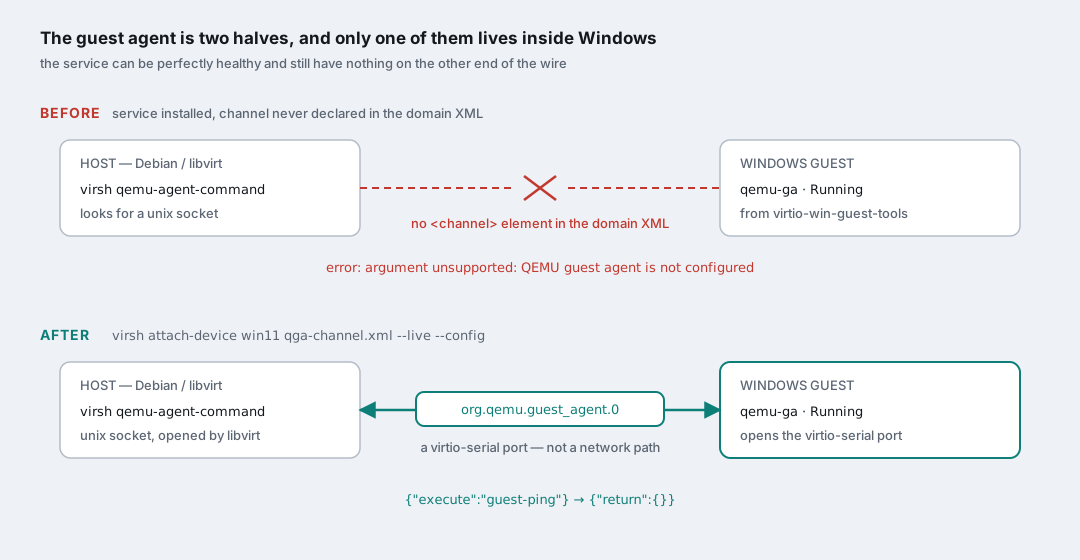
The fix is three lines of XML and a hot attach:
1
2
3
4
5
6
7
$ cat > /tmp/qga-channel.xml <<'XML'
<channel type='unix'>
  <target type='virtio' name='org.qemu.guest_agent.0'/>
</channel>
XML

$ sudo virsh attach-device win11 /tmp/qga-channel.xml --live --config
--live applies it to the running VM, --config writes it into the persistent definition so it survives the next boot. Use both, or you will do this again after the first reboot and be very confused. And then:
1
2
$ sudo virsh qemu-agent-command win11 '{"execute":"guest-ping"}'
{"return":{}}
That empty return is one of the more satisfying empty returns I have had this year.
Worth noticing what this channel is not: it is not the network. It is a paravirtualised serial port between QEMU and the guest. That means it keeps working when the guest’s networking is broken, misconfigured, or not configured at all — which, on a freshly installed VM, is precisely the situation. It is the one door that is open before you have built any of the others.
The recipe: running a command inside the guest
guest-exec is the interesting verb. In its simplest form you point it straight at an executable and hand it an argument vector:
1
2
3
4
5
6
$ sudo virsh qemu-agent-command win11 \
  '{"execute":"guest-exec","arguments":{
      "path":"C:\\Windows\\System32\\netsh.exe",
      "arg":["interface","ip","set","address","name=Ethernet","static",
             "192.168.20.10","255.255.255.0"],
      "capture-output":true}}'
Note there is no shell in there. arg is an array that goes to CreateProcess, not a command line to be parsed, so quoting and && and pipes do not exist for you. For anything with logic in it you want PowerShell, and PowerShell brings its own quoting problem: you would be embedding a PowerShell command, inside a JSON string, inside a shell single-quoted argument. That way lies madness.
The way out is -EncodedCommand, which takes the whole script as base64 — but base64 of UTF-16LE, not UTF-8. Encode it wrong and PowerShell will fail in ways that look nothing like an encoding problem.
Then there is the second half of the protocol, and this is the bit that surprised me: guest-exec is asynchronous. It does not return your output. It returns a process id, immediately, and that’s it.
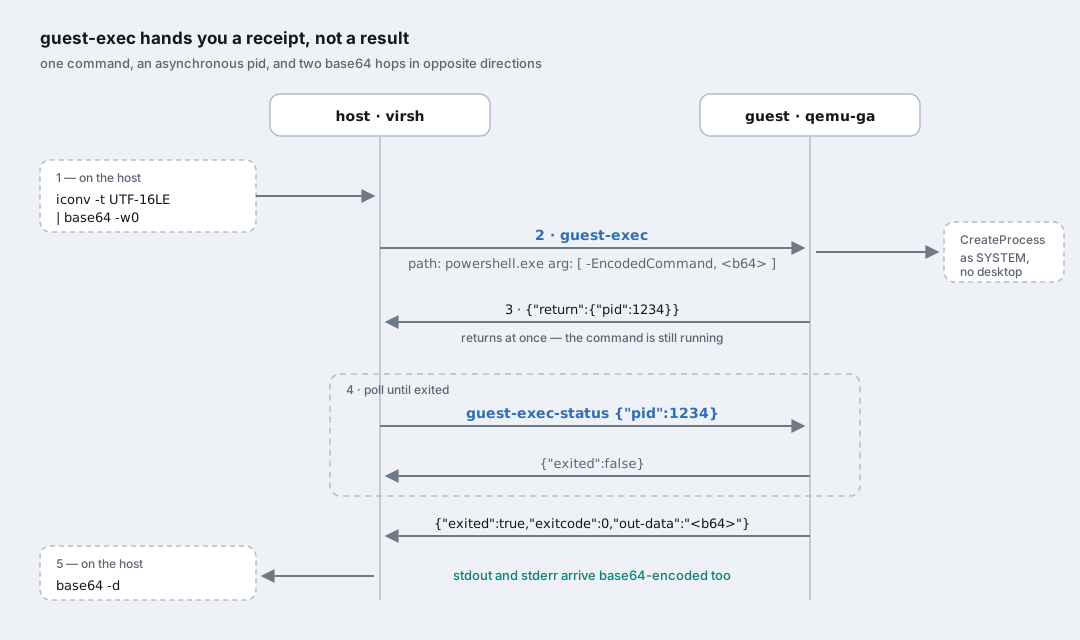
So the full loop is: encode, exec, get a pid, poll guest-exec-status with that pid until exited is true, then decode out-data and err-data — which come back base64-encoded as well, going the other way.
Five steps for one command is too much to type by hand more than twice, so it became a script. This is roughly what I ended up with, and it is the single most reusable thing to come out of the whole exercise:
1
2
3
4
5
6
7
8
9
10
11
12
13
14
15
16
17
18
19
20
21
22
23
24
25
26
27
#!/usr/bin/env bash
# qga-ps <domain> <powershell command...>
set -euo pipefail
dom=$1; shift

enc=$(printf '%s' "$*" | iconv -f UTF-8 -t UTF-16LE | base64 -w0)

req=$(jq -nc --arg enc "$enc" '{
  execute: "guest-exec",
  arguments: {
    path: "C:\\Windows\\System32\\WindowsPowerShell\\v1.0\\powershell.exe",
    arg: ["-NonInteractive","-NoProfile","-EncodedCommand",$enc],
    "capture-output": true
  }}')

pid=$(virsh qemu-agent-command "$dom" "$req" | jq -r '.return.pid')

while :; do
  st=$(virsh qemu-agent-command "$dom" \
        "$(jq -nc --argjson p "$pid" '{execute:"guest-exec-status",arguments:{pid:$p}}')")
  [ "$(jq -r '.return.exited' <<<"$st")" = "true" ] && break
  sleep 1
done

jq -r '.return."out-data" // empty' <<<"$st" | base64 -d
jq -r '.return."err-data" // empty' <<<"$st" | base64 -d >&2
exit "$(jq -r '.return.exitcode' <<<"$st")"
Let jq build the JSON rather than doing it with string concatenation — the Windows path alone, with its backslashes needing to survive both the shell and JSON, is enough of a reason.
With that in place the guest stops feeling like a VM you visit and starts feeling like a host you can script against.
Things I did without ever looking at the screen
For the record, everything below was done with that one channel, on a Windows install that had never had a network configured, an RDP session, or a mouse click after OOBE.
A static IP on the interface facing the container network:
1
netsh interface ip set address name=Ethernet static 192.168.20.10 255.255.255.0
Let the thing answer a ping, because Windows blocks inbound ICMP echo by default and you will otherwise spend ten minutes debugging a network that is perfectly fine:
1
2
netsh advfirewall firewall add rule name="ICMP Allow incoming V4 echo request" \
  protocol=icmpv4:8,any dir=in action=allow
Find out which drive letter Windows gave a CD-ROM I had attached to the VM, because of course you can’t guess it:
1
Get-Volume | Where-Object DriveType -eq CD-ROM
Install an MSI silently, wrapped in Start-Process -Wait -PassThru so the exit code actually comes back to me instead of msiexec detaching and reporting success:
1
2
3
$p = Start-Process msiexec.exe -Wait -PassThru -ArgumentList `
  '/i F:\some-package.msi /quiet /norestart /log C:\Windows\Temp\install.log'
$p.ExitCode
Enable RDP — which is a nice one, because it is exactly the thing people open a graphical console for. It is three unrelated switches that all have to be flipped:
1
2
3
4
5
Set-ItemProperty -Path "HKLM:\System\CurrentControlSet\Control\Terminal Server" `
  -Name fDenyTSConnections -Value 0
Set-Service -Name TermService -StartupType Automatic
Start-Service TermService
Enable-NetFirewallRule -DisplayGroup "Remote Desktop"
Registry flag, service, firewall group. Miss any one of the three and you get a different flavour of “it doesn’t work”.
And, as a sanity check that doesn’t need guest-exec at all, the agent will just tell you what the guest thinks its addresses are:
1
$ sudo virsh qemu-agent-command win11 '{"execute":"guest-network-get-interfaces"}'
The trap: a rule can be Enabled and still not exist for you
Here is the one that genuinely got me, and the reason this post has a third diagram.
I had an SSH server installed in the guest. I checked everything a reasonable person checks:
- the service was running, and
Get-NetTCPConnection -LocalPort 22showed itLISTENINGon0.0.0.0:22; - the installer’s own firewall rule was there, and
Get-NetFirewallRulereportedEnabled: True.
Listening. Rule enabled. Port unreachable from the host. I went round that loop three times before I stopped re-checking the same two facts and looked at a third one.
Windows firewall rules are scoped to network profiles — Domain, Private, Public. The rule was scoped to Private. And a newly configured interface, one that has never seen a domain controller and that you never answered a “do you want this PC to be discoverable?” prompt for, gets classified as Public by default. So the rule was enabled, correct, and simply never evaluated for traffic arriving on that interface, which fell through to the default inbound block.
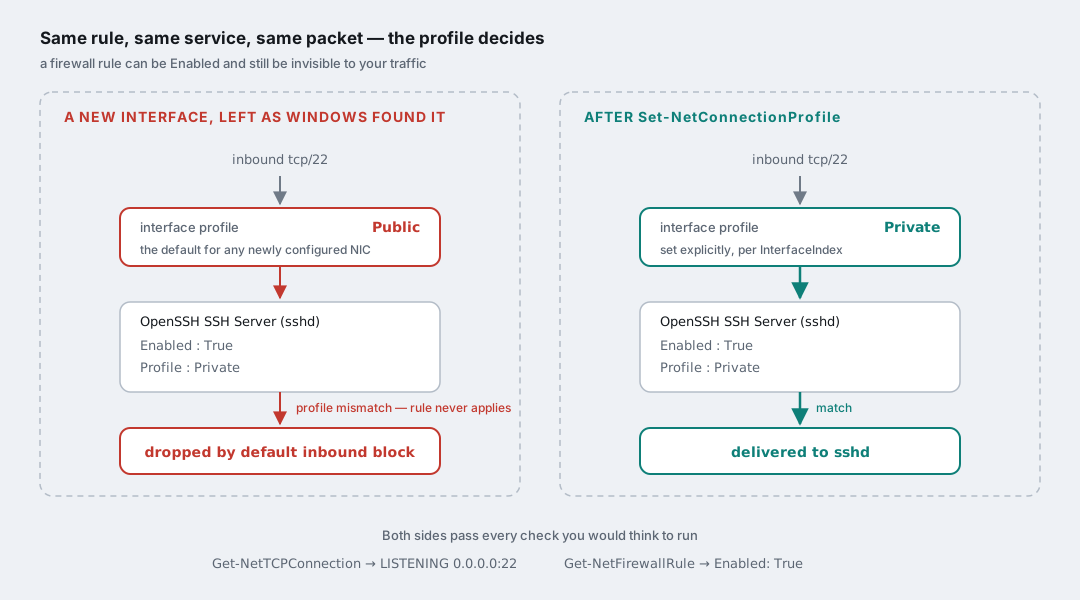
The fix, run through the guest agent like everything else:
1
2
3
Get-NetConnectionProfile | ForEach-Object {
  Set-NetConnectionProfile -InterfaceIndex $_.InterfaceIndex -NetworkCategory Private
}
After that, both SSH and RDP answered on the VM’s address straight away.
What I take from it is not “remember to set the profile”. It is that Enabled: True answers a question I wasn’t actually asking. The rule’s own state tells you nothing about whether the rule is in scope for the path your packet is taking. Two perfectly true observations can add up to a wrong conclusion, and it is worth having a reflex for “which third thing am I not looking at?” — the same reflex I needed when auditing nftables on this very host, where a rule was fine and simply unreachable.
It’s just cloud-init, applied late
The frame that made all of this click for me: this is the cloud-init habit, applied to a machine that was never built for it.
On Linux you take for granted that a VM configures itself from a datasource at first boot and you never touch a console. Windows has an equivalent — Cloudbase-Init, plus an autounattend.xml for the install itself — and that is genuinely where this should end up: a golden image, thin overlay clones, a config drive per instance. That’s the next piece of work.
But the guest agent gives you most of the same leverage retroactively, on a VM that already exists, with no image build and no re-install. Once the channel is there, the vast majority of what people open RDP or a VNC console for on a fresh guest — addressing, firewall, services, installing something, reading back a value to check — is scriptable, repeatable, and lands in your shell history instead of your short-term memory.
A few things I’d keep in mind:
- Put the channel in your domain template. It costs nothing on a VM that never uses it, and if it isn’t there, you can only add it from the host anyway — so on the day the guest’s network is broken and you actually need the side door, it either exists already or it doesn’t.
--live --config, always. A hot-attached device that isn’t in the persistent config is a surprise waiting for the next reboot.- The pid is a receipt, not a result. Anything that treats
guest-execas synchronous will look like it worked and tell you nothing. - UTF-16LE, then base64. Every time.
- Check the exit code, not just the output.
msiexecin particular will happily return control long before it has done anything, unless you make it wait. - This is remote code execution by design.
guest-execruns as SYSTEM in session 0. Anyone who can talk to libvirt on the host owns the guest, completely, with no login and no trace in the guest’s interactive sessions. That is the whole point of the feature, and it is worth being deliberate about who has that access.
The console is still there for the day something goes properly wrong. I just haven’t needed to open it since.