No internet, on purpose
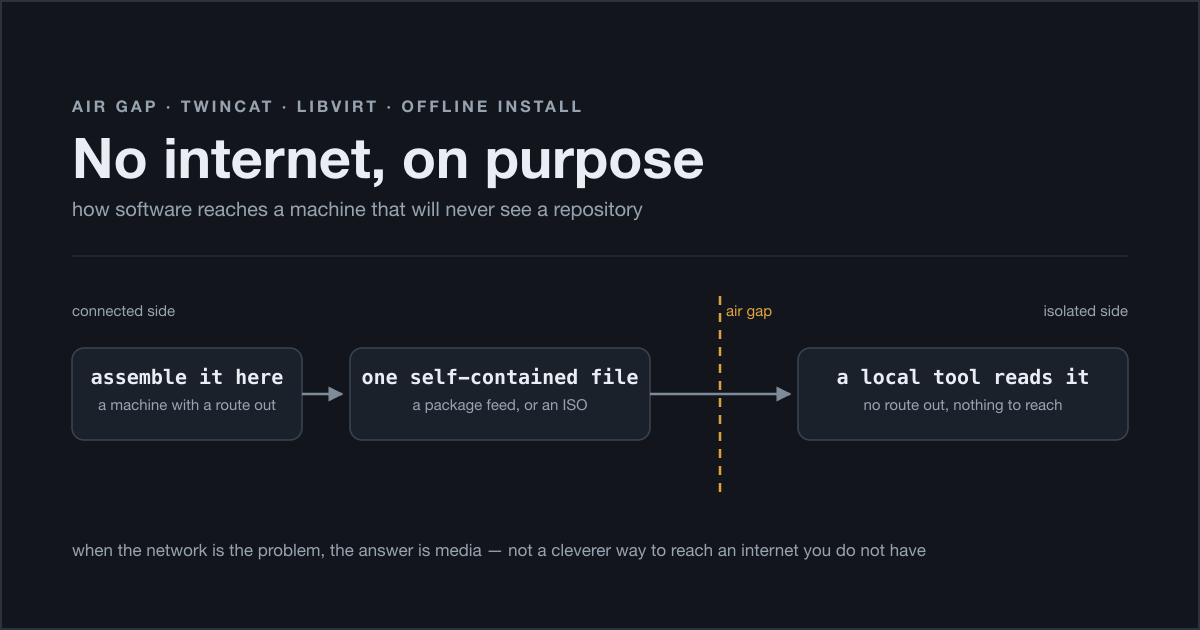
Same machine as last time: a Beckhoff industrial PC running TwinCAT Linux RT, with a Windows 11 guest on top under KVM/libvirt. The detail that matters today is one I mentioned only in passing back then — neither the host nor the guest has internet access, and that is not a fault waiting to be fixed. It is an isolated OT network. The absence of a route out is a feature somebody paid for.
Which is fine right up to the moment you have to install something.
In one afternoon I needed to put two pieces of software on that VM: TwinCAT XAE, and an SSH server. Two problems that look identical from a distance and turn out to be completely different once you are up close. The interesting part is not either solution — it is what the pair of them taught me about how to approach this whole class of problem.
The reflex you have to unlearn
My first instinct, and I suspect it is everybody’s, was to think about connectivity. Could I put a proxy somewhere? A temporary NAT on the host? A route through the machine I was already SSH’d in from?
All of those are the wrong question, for two reasons.
The boring one is governance: the isolation is a deliberate property of the system, and punching a hole in it “just for five minutes to install a thing” is precisely the mechanism by which networks stop being isolated. Nobody ever removes the temporary hole.
The practical one is that a one-off tunnel is not a procedure. I was going to need to do this again — next install, next rebuild, next machine — and “I set up something clever that afternoon” does not survive contact with future me.
The question that actually gets you somewhere is different: what channel do I already control, and can it carry a file?
There are two air gaps here, not one
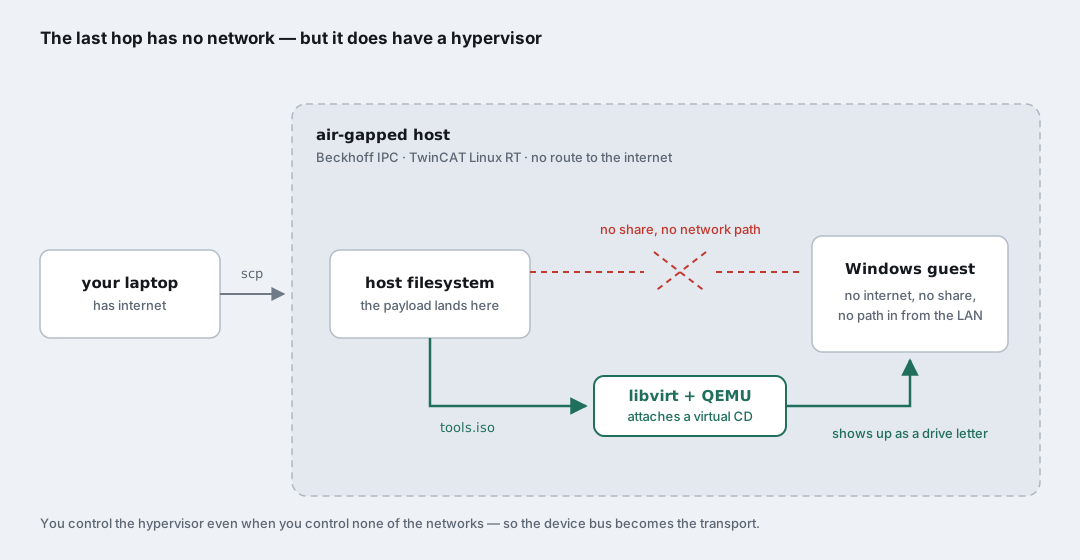
Worth drawing, because I had been thinking of it as a single boundary and it is really two, with very different properties.
Between my laptop and the host there is no internet route, but there is a file channel: I have an admin SSH session to that box, so scp works, and anything I can put in a file I can put on the host’s disk. That boundary is solved.
Between the host and the guest there is nothing. No shared folder. No network path the guest can use to pull anything. No internet on either side of it. As far as file transfer goes, the guest might as well be in another building.
Except that I own the hypervisor. And a hypervisor’s entire job is handing devices to a guest which is in no position to refuse them. That is the channel. It was there the whole time; it just does not look like a network, which is why it takes a moment to see.
Case A: when the vendor already thought about it
TwinCAT XAE first, because it is the happy case and it sets up the contrast.
TwinCAT Package Manager (tcpkg) is NuGet underneath. Packages are .nupkg files, and in NuGet’s world a “repository” is not necessarily a server — a plain folder full of packages is a perfectly valid source. Which means an offline install is not a workaround here. It is a first-class, documented mode, because the vendor’s own build infrastructure has exactly the same problem you do.
So, on any ordinary Windows machine with internet:
1
2
tcpkg source add -n=OfflineFeed -s="C:\path\tcpackoffline\"
tcpkg download twincat.standard.xae -o C:\path\tcpackoffline\
download walks the whole dependency graph and drops everything into that folder — the XAE package and every single thing it needs, .NET included. What you end up with is a self-contained directory.
Copy it across (scp, WinSCP, whatever you have), add it as a source on the air-gapped machine, install from it. Done. No cleverness required, nothing fought, nothing bypassed.
The takeaway from case A is not a command, it is a habit: before you invent a transport, check whether the tool already has an offline mode. Anything built on top of a package-file format — nupkg, deb, rpm, wheel — very probably does, and it will be better than whatever you were about to improvise, because it handles the dependency resolution you would otherwise do by hand at two in the morning.
Case B: when nobody thought about it for you
Now the SSH server. A fresh Windows 11 install has no SSH server running, and the documented way to get one is a single line:
1
Add-WindowsCapability -Online -Name OpenSSH.Server~~~~0.0.1.0
which fails with 0x8024402C.
That error deserves a note, because it is genuinely misleading. OpenSSH Server is a Feature on Demand, and Add-WindowsCapability -Online wants to fetch it from Windows Update. On many builds the payload is already sitting locally in WinSxS and the command works offline anyway — which is worse than if it never worked, honestly, because it means the behaviour is unpredictable. Sometimes it succeeds on an isolated machine, sometimes it does not, and you cannot tell in advance which kind of image you are holding. On this one it did not.
The important bit: 0x8024402C looks like a network problem you are supposed to go and fix. It is not. There is no reliable offline path through that cmdlet, so stop trying to make it reach a server and go get the software a different way.
Happily, Win32-OpenSSH — the same implementation, maintained by the PowerShell team — ships as a plain standalone MSI. Self-contained, no downloader stub, no phone-home. Exactly the kind of artefact that can cross a gap.
The procedure, which is the actual subject of this post:
1. Fetch and verify, on the connected side. Download the MSI from the project’s official release page and check the published checksum. Do this properly, even if you normally skip it. This file is about to enter a network that has no other channel through which it could ever be told it was tampered with, and it is going to be executed with SYSTEM privileges. The connected side is the only place where verification is even possible.
2. Put it in a box. Wrap the installer in a small ISO. On macOS:
1
hdiutil makehybrid -iso -joliet -default-volume-name TOOLS -o tools.iso ./payload/
On Linux, genisoimage or mkisofs do the same job. The result is one file, which is the whole point.
3. Carry the box. scp the ISO onto the host, into the libvirt images directory.
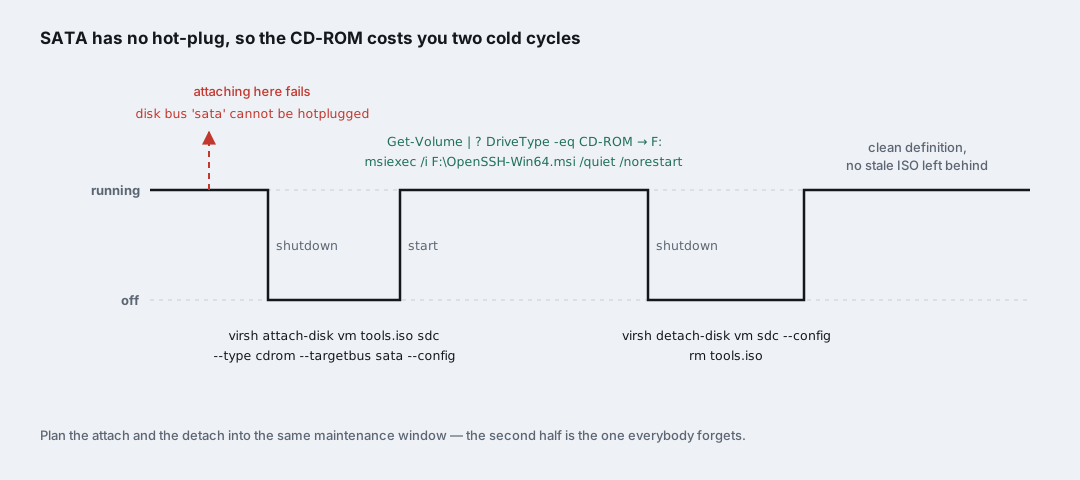
4. Hand it to the guest — cold. Here is the practical detail that cost me a few minutes of confusion:
1
2
3
4
virsh shutdown win11
virsh attach-disk win11 /var/lib/libvirt/images/tools.iso sdc \
  --type cdrom --mode readonly --targetbus sata --config
virsh start win11
Attempt that while the VM is running and you get disk bus 'sata' cannot be hotplugged. The SATA controller simply does not do hot-plug, so the CD-ROM costs you a shutdown and a start. --config writes the change into the persistent domain definition rather than the live one, which is what you want when the machine is off anyway.
5. Install it. Inside the guest, find the drive letter — do not assume, this guest already had a Windows ISO and a virtio-win ISO attached and the new one landed on F::
1
2
3
4
Get-Volume | ? DriveType -eq CD-ROM

Start-Process msiexec.exe -ArgumentList `
  "/i F:\OpenSSH-Win64.msi /quiet /norestart /log C:\Windows\Temp\openssh-install.log" -Wait
And that closes the circle: the MSI sets up sshd and ssh-agent as automatic services and adds its own firewall rule, all locally, without a single packet leaving the machine.
6. Take the box away again. Shut down, virsh detach-disk win11 sdc --config, delete the ISO file.
This step is the one everybody skips, and I want to argue for it. An ISO left attached does not hurt anything at runtime — it becomes part of the machine’s permanent definition, which is a different kind of damage. Six months from now somebody reads that XML, finds a CD-ROM pointing at tools.iso, and has to work out whether removing it will break something. Temporary transport should look temporary.
The shape underneath both
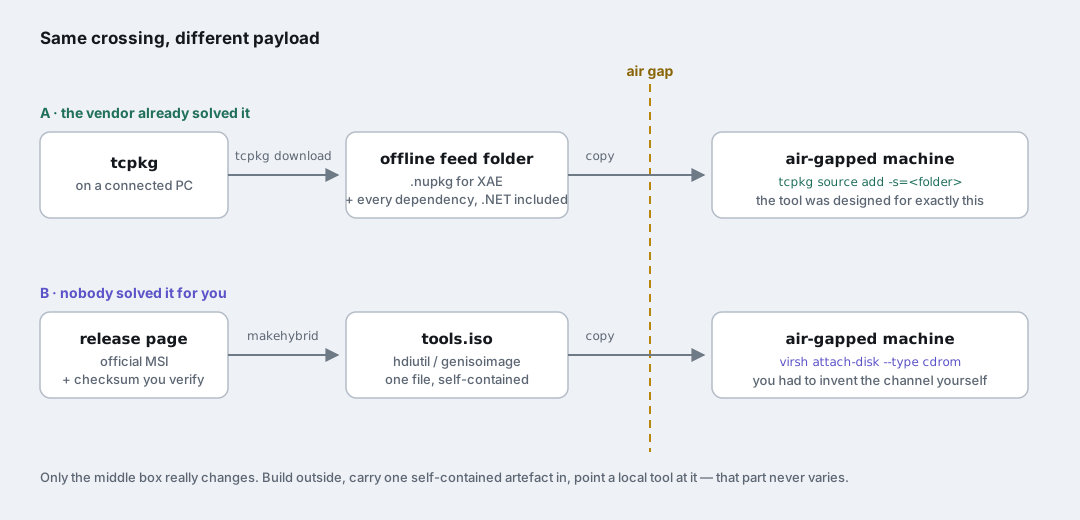
Line the two cases up and they are the same manoeuvre.
Assemble a self-contained artefact on the connected side. Carry exactly one thing across. Point a local tool at it. The only real difference is who built the reading half: tcpkg brought its own, and for the MSI I had to supply a CD-ROM drive.
Which reframes the ISO from “a trick for installing OpenSSH” into what it actually is: a general-purpose transport for any payload the isolated machine can consume on its own. An MSI, a zip, a script, a whole offline package repository, a config drive. The mechanics do not change; only the contents do.
That reframing has a payoff. The plan for making this VM reproducible — an unattended install reading an answer file, then Cloudbase-Init picking up a config drive generated on the host at each boot — is not a new technique to learn. It is this same injected-media pattern with a schedule bolted on. Once you see the shape, the automation is an obvious extension rather than a separate project.
So, the rule I would write on a sticky note: when your problem is the guest’s network, the answer is almost always some form of injected media, not a cleverer route to an internet you do not have.
The bits that will bite you
- Verify checksums on the connected side. It is the only side where you can, and the payload runs privileged on the other one.
- SATA does not hot-plug. Budget two power cycles for the CD-ROM, and plan the attach and the detach into the same maintenance window.
- Do not assume the drive letter. On a machine with a couple of ISOs already attached, the new one is not
D:. - Install silently, and log to a file.
/quiet /norestart /log ...— there is nobody watching that console, and the log is your only evidence when it goes wrong. - Detach and delete when you are finished. A stale ISO in a domain definition is a question you are leaving for somebody else.
- Installed is not the same as working. The very next thing that went wrong had nothing to do with the air gap: the service was listening, its firewall rule was enabled, and the port was still unreachable — because a freshly configured Windows NIC is categorised as
Publicby default, and the OpenSSH rule is scoped toPrivate. Getting the software there and getting it working are two separate afternoons.
Logistics, not networking
The thing that changed for me over that afternoon was not learning a command. It was noticing that an air gap stops being frustrating the moment you stop treating it as a networking problem.
As a networking problem it is a wall, and every solution is some flavour of tunnelling through it, which is exactly what you are not supposed to do. As a logistics problem it is completely mundane, and logistics has had the answer for a very long time: put the thing in a box, carry the box, unpack it at the other end, take the box away.
The industrial PC on my desk has no route to the internet and it is never going to have one. It also has, as of that afternoon, everything on it that it needs.